Introduction:
In the world of generative AI, the tool is only as good as the input. We’ve all been there: typing a simple phrase like, “a cat in a hat, digital art,” into an image generator, only to receive something… fine. It’s technically a cat. It has a hat. But it lacks soul, specificity, and that spark that makes you want to share it.
This is where Gemini Image Prompts change the game. Google’s Gemini, particularly with its native image generation capabilities, is proving to be a powerhouse. But unlocking its true potential—moving from simple keyword dumps to crafting visual masterpieces—requires understanding prompt engineering. This guide, written from the perspective of someone diving deep into the process (that’s me, your fellow content explorer!), will walk you through the structured thinking required to generate stunning, unique visuals, moving you from a beginner who types keywords to a pro who directs creation.
The Novice Mindset – What Not to Do
The first mistake many new users make is treating Gemini like a standard Google search bar. Search is about retrieval; image generation is about creation.
When starting out, most people rely on three vague descriptors: Subject, Medium, and Vibe.
- Subject: A warrior. (Too broad. Is it fantasy? Sci-fi? Historical?)
- Medium: Oil painting. (Okay, but what kind of oil painting?)
- Vibe: Cool. (Meaningless to an AI.)
If this is your starting point, you are likely getting generic results that lack originality. The core of prompt engineering is replacing vague terms with precise, sensory instructions.
The Four Pillars of an Exceptional Gemini Prompt
To elevate your output, structure every request around four critical pillars. Think of these as the blueprint for your visual idea.
Pillar 1: The Subject & Action
This is your central focus. Be granular. Don’t say “a person”; say “a grizzled, 60-year-old lighthouse keeper with a thick, salt-and-pepper beard, wearing a weathered yellow slicker.”
- Specificity is paramount: Detail the age, expression, clothing, and unique accessories of your subject.
- Action: Give your subject something to do. Instead of “a dog,” try “a golden retriever heroically leaping over a pile of autumn leaves.”
Pillar 2: The Context & Environment
The background dictates the mood. A subject in a vacuum is uninteresting.
- Setting: Is it a fog-draped medieval marketplace or a sterile, chrome-plated spacecraft interior?
- Atmosphere: Incorporate weather, time of day, or surrounding objects. For example, mention “mist rising from the cobblestones” or “the sharp glint of neon signs reflecting in a puddle.”
Pillar 3: The Style & Medium
This is where you tell Gemini which artistic lens to use. This needs to be explicit and often includes references to established aesthetics.
- Artistic Style: Instead of just “cartoon,” try “Pixar-style 3D render,” “Japanese woodblock print,” or “Vaporwave aesthetic.”
- Technical Details: This is the Pro secret. Use photographic terms: Low-angle shot, wide-angle lens, bokeh effect, shallow depth of field. Use artistic terms: Impasto technique, chiaroscuro lighting, muted pastels.
Pillar 4: The Constraint & Iteration
The final layer is about control and steering. This often involves using negative prompts (telling the AI what not to generate) or iterative commands.
- Negative Prompts (What to Avoid): If you are getting odd results (like mangled hands, which is a common AI hurdle), explicitly state: No visible hands, no extra limbs, no harsh digital artifacts.
- Aspect Ratio: Always define the output shape, such as vertical portrait orientation, Cinematic 16:9 widescreen, or Square format.
Putting It Together – Prompt Formulas That Work
To solidify this, let’s look at a structured formula you can adapt.
The “Pro Creator” Prompt Template:
[Style/Medium] of a [Specific Subject with Appearance/Action] set in a [Detailed Environment/Context]. The lighting is [Specific Lighting Term, e.g., ‘rim lighting’ or ‘overcast’] creating a [Descriptive Mood] atmosphere. Shot with a [Camera Detail, e.g., ’85mm lens’], emphasizing [Key Texture/Detail]. [Aspect Ratio]. [Negative Constraints].
Example Prompt using the Template:
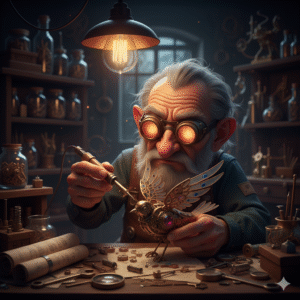
3D Render of a wizened gnome inventor with glowing spectacles, meticulously soldering a tiny clockwork bird set in a cluttered Victorian-era workshop filled with brass tools and dusty blueprints. The lighting is harsh, single-source overhead tungsten light creating a focused, intense atmosphere. Shot with a macro lens, emphasizing the fine metallic filigree of the bird’s wings. Square format. No lens flare, no cartoonish exaggeration.
OutPut:
Iteration: The True Mark of a Prompt Master
Your first prompt is rarely your last. The real skill in Gemini image generation is conversation. You must be prepared to follow up.
- The Follow-Up Edit: If the gnome’s spectacles were too small, your next prompt isn’t a total rewrite. It’s a targeted edit: “Using the previous image, increase the size and glow of the spectacles by 20%.”
- Style Transfer: If the realism is almost perfect but you want a different feel: “Now, reimagine that entire scene in the style of a 1970s pulp sci-fi paperback cover.” This tests Gemini’s ability to retain the composition while swapping the aesthetic.
Why This “Human” Editing Works: It mirrors how a traditional artist works—sketch first, then refine the lighting, then finalize the textures. It shows you are directing a process, not just spamming commands.
Conclusion: Your Canvas Awaits
Gemini Image Prompts offer an incredible tool for visual communication, whether you’re a designer needing mockups, a blogger needing unique header images, or just a hobbyist exploring creativity. The journey from “Novice” to “Pro” is simply the shift from asking for something to describing a vision.
Start simple, master the four pillars, and most importantly: Don’t be afraid to iterate. The most captivating images rarely come from the first attempt. They come from the user who knows exactly what they want and guides the AI with deliberate, precise language.
Now, head over to your Gemini interface. You have the blueprint. Go create something truly unique!
Leave a Reply